Getting Started with AIOSchema ◈︎
Overview
AIOSchema is an open standard for establishing, maintaining, and preserving the integrity, authenticity, and provenance of any digital or physical asset. It defines a minimal, verifiable manifest: a small JSON document that records what an asset is, who created it, and when it existed – independently of any platform, storage system, or proprietary tool.
The standard is built around three conformance levels. Each level adds a distinct layer of trust on top of the previous one:
| Level | Name | What it gives you |
|---|---|---|
| Level 1 | Integrity | Tamper detection. Any change to the asset or the manifest is detectable. No key, no network, no external service required. |
| Level 2 | Authenticity | A cryptographic signature binding the manifest to a keypair. You can attribute the asset to a specific creator and detect extension tampering. |
| Level 3 | Temporal Proof | An independently verifiable, immutable timestamp proving the asset existed in this exact state at a specific point in time. |
Each level is a strict superset of the one before it. A Level 3 manifest passes all Level 1 and Level 2 checks. You do not skip levels.
This guide covers how each level works procedurally: what is computed, in what order, and what verification does at each step. It uses a real manifest from the AIOSchema homepage as the running example throughout.
Prerequisites: Familiarity with SHA-256 and JSON. No specific programming language is required to follow this guide.
Part 1: The Manifest
1.1 Structure
An AIOSchema manifest is a JSON object with two top-level keys:
{
  "core": { },
  "extensions": { }
}
The Core Block is the tamper-evident identity record. It contains the fields required for deterministic verification. These fields are architecturally frozen: any modification to them produces a different asset identity, not a new version of the same asset. The core block is what every verifier checks.
The Extensions Block carries additional metadata: AI disclosure records,
compliance documentation, soft binding for images, licensing, and
platform-specific fields. Extensions do not affect the core fingerprint
computation. They can be added, updated, or removed without invalidating
the core integrity check. When a manifest_signature is present (Level 2
and above), the extensions block is covered by that signature, so tampering
with extensions is also detectable.
1.2 The Sidecar File
A manifest is stored as a sidecar file alongside the asset it describes. The naming convention is strict:
<original-filename><original-extension>.aios.json
So index.md becomes index.md.aios.json. photo.jpg becomes
photo.jpg.aios.json. The sidecar MUST contain the complete manifest –
both core and extensions blocks – as UTF-8 JSON.
The sidecar exists because the manifest must be able to travel independently
of the asset. Platforms strip embedded metadata. Files get renamed,
rehosted, and re-distributed. The sidecar is a separate file that carries
the full provenance record and can be stored, transmitted, and verified on
its own. When a manifest_signature is present, the sidecar is
self-verifying: its integrity can be confirmed without even accessing the
original asset file.
1.3 A Real Manifest
The following is the actual manifest for the AIOSchema homepage
(index.md), shown in full at Level 3. The sections below will walk
through how each part of this manifest is constructed and verified.
{
  "core": {
    "asset_id": "9a6dc80f-08aa-56e8-b385-a1346bcb7b6a",
    "schema_version": "0.5.6",
    "creation_timestamp": "2026-06-21T13:35:44Z",
    "hash_original": "sha256-eb862177bdb5db24aa5a915234b3bc756c17ebfcd1f0e22c143337b353a83b2a",
    "creator_id": "ed25519-fp-ebc64203390ddefc442ade9038e1ae18",
    "core_fingerprint": "sha256-241038592e5bad13b4a9f7cf7f1cf112af0ddbb7dd3f4e544c6463719e1f2298",
    "signature": "ed25519-7404d5e4f1cee8a70cfbd7f6dbdb83a1f37a48407a99e50a141d0d30208d21aec75612551f28b4565ca61b22cd2d35d151e5b34398cfd9e5ec194898c672d10a",
    "manifest_signature": "ed25519-286e24741c0d94afb90bc540a8e0d88dcdfccf26a44d8d47622fddf10ad0bf706cdb39e671687a40386cc7c459d5fa4bd148ec67294e6f7486652791ae8b270d",
    "anchor_reference": "aios-anchor:rfc3161-aimoda:eb862177bdb5db24aa5a915234b3bc756c17ebfcd1f0e22c143337b353a83b2a",
    "previous_version_anchor": null
  },
  "extensions": {
    "asset_name": "AIOSchema",
    "description": "AIOSchema",
    "ai_declaration": {
      "ai_generated": false,
      "ai_manipulated": false,
      "human_reviewed": true,
      "standard_editing": true,
      "creative_work": false,
      "disclosure_required": false
    },
    "compliance": {
      "eu_art50": {
        "reviewer_id": "ed25519-fp-ebc64203390ddefc442ade9038e1ae18",
        "editorial_responsibility": "Ovidiu Ancuta, Project AIOSchema",
        "review_type": "substantive"
      }
    },
    "public_key": "Fi00S1HLbSi+eXOLuFDByIBNW9vOBbTZ3nsYbISeBlY=",
    "compliance_level": 3
  }
}
This manifest will be used as the reference example throughout this guide. At each level, you will see exactly which fields are populated and which remain null.
Part 2: Core Block Fields
Before working through the levels, it helps to understand what each core field is and why it exists.
asset_id
A UUID that uniquely identifies this asset. UUID v7 is preferred because it is time-ordered: the creation timestamp is encoded into the UUID itself, making it sortable and traceable. UUID v4 (random) is also accepted. Neither format contains personal data.
The asset_id is assigned once at manifest creation and never changes. It
is the stable identity of the asset across all future versions of the
manifest, across platforms, and across time.
In the homepage manifest: 9a6dc80f-08aa-56e8-b385-a1346bcb7b6a
Note the 56e8 segment: the 5 and 6 indicate this is a UUID v7
(time-ordered, version 7).
schema_version
The AIOSchema specification version the manifest conforms to. Verifiers
reject manifests with an unknown schema_version and return a clear error
identifying the unsupported version. This field locks the manifest to a
specific interpretation of all other fields.
In the homepage manifest: "0.5.6"
creation_timestamp
The UTC timestamp of when the manifest was created. It must be formatted
as ISO 8601 with a trailing Z (indicating UTC). Timestamps without the
Z suffix, or in any local timezone format, are rejected. This is not the
timestamp of the original asset creation – it is the timestamp of when
this manifest was generated.
In the homepage manifest: "2026-06-21T13:35:44Z"
hash_original
The cryptographic binding between the manifest and the asset. This is the
SHA-256 hash of the raw binary bytes of the original file, formatted as a
prefixed string: sha256-<64-character hex digest>.
hash_original can also be an array of hashes for multi-algorithm
manifests: ["sha256-<hex>", "sha384-<hex>"]. The array form is
recommended for new manifests because it supports algorithm agility –
if SHA-256 is ever deprecated, a manifest carrying both SHA-256 and SHA-384
continues to be verifiable using the stronger algorithm.
In the homepage manifest: "sha256-eb862177bdb5db24aa5a915234b3bc756c17ebfcd1f0e22c143337b353a83b2a"
creator_id
The identity of the manifest creator. Two modes are supported:
Anonymous mode: A UUID v7 or UUID v4. No identity is disclosed. The verifier treats this as an unattributed provenance record. Integrity (Level 1) is still fully verifiable.
Attributed mode: ed25519-fp-<32-character hex>. This is the
SHA-256 fingerprint of the creator’s Ed25519 public key, truncated to the
first 128 bits (32 hex characters). The verifier infers the mode from the
value: a UUID indicates anonymous, an ed25519-fp- prefix indicates
attributed.
In the homepage manifest: "ed25519-fp-ebc64203390ddefc442ade9038e1ae18"
This tells any verifier that the creator holds the Ed25519 keypair whose
public key hashes to ebc64203390ddefc442ade9038e1ae18. Signature
verification (Level 2) confirms the creator actually holds the corresponding
private key.
core_fingerprint
A SHA-256 hash of the five fields above, serialized as canonical JSON. It
is the self-integrity check on the core block: if any of the five input
fields are changed, the core_fingerprint will no longer match, and
verification will fail.
core_fingerprint cannot include itself in its own computation. This is
the bootstrap rule: the field is excluded from the set of fields being
fingerprinted, then the hash is computed, then the result is written into
core_fingerprint. The computation is described in full in Part 3.
In the homepage manifest: "sha256-241038592e5bad13b4a9f7cf7f1cf112af0ddbb7dd3f4e544c6463719e1f2298"
Part 3: Level 1 – Integrity
What Level 1 gives you
A Level 1 manifest provides tamper detection. You can prove that the asset has not been modified since the manifest was created, and that the core block fields have not been altered. No cryptographic key is required. No network access is required. No external service is required.
What Level 1 does not give you: attribution. Anyone can create a Level 1
manifest for any file. The creator_id at Level 1 may be an anonymous UUID.
Signature verification – the proof that the creator holds a specific
keypair – is a Level 2 requirement.
3.1 Computing hash_original
The hash is computed over the raw binary bytes of the file, exactly as it exists on disk. No decoding, no format-specific pre-processing, no transformation of any kind. The file is read as bytes and hashed as bytes.
For physical assets, the asset is represented by the bytes of its digital proxy – the photograph, scan, or structured description that was produced to document the physical object. The hash covers that proxy file.
The result is formatted with an algorithm prefix: sha256- followed by the
64-character lowercase hex digest. This prefix is not decorative – it is
part of the value. The verifier uses it to know which algorithm to apply
when recomputing the hash.
For multi-hash manifests, the same process is repeated for each desired
algorithm and the results are stored as a JSON array. The array must
include at least one sha256 entry. Any supported algorithm may be added.
During verification, the verifier attempts each algorithm it supports and
succeeds if any one of them produces a match.
3.2 Computing core_fingerprint
The core_fingerprint is computed over exactly these five fields, taken
from the core block:
asset_idcreation_timestampcreator_idhash_originalschema_version
The field core_fingerprint itself is excluded. This is the bootstrap
exclusion: you cannot include the hash in the data being hashed.
The five fields are serialized as canonical JSON before hashing. Canonical JSON means: keys sorted alphabetically, no whitespace between tokens, UTF-8 encoding, no trailing commas. The sort order is what the list above reflects – alphabetical, not the order the fields appear in the manifest.
The canonical serialization of the five fields from the homepage manifest would look like this (the actual bytes that are hashed):
{"asset_id":"9a6dc80f-08aa-56e8-b385-a1346bcb7b6a","creation_timestamp":"2026-06-21T13:35:44Z","creator_id":"ed25519-fp-ebc64203390ddefc442ade9038e1ae18","hash_original":"sha256-eb862177bdb5db24aa5a915234b3bc756c17ebfcd1f0e22c143337b353a83b2a","schema_version":"0.5.6"}
SHA-256 is applied to the UTF-8 encoding of that string. The result is
prefixed with sha256- to produce the core_fingerprint value. Any
deviation – a different field order in the serialization, any extra
whitespace, a different value for any of the five fields – produces a
completely different hash.
3.3 Generating a Level 1 Manifest
The following is the homepage manifest as it would look at Level 1 –
the five required fields, the computed core_fingerprint, and all
signature and anchor fields set to null:
{
  "core": {
    "asset_id": "9a6dc80f-08aa-56e8-b385-a1346bcb7b6a",
    "schema_version": "0.5.6",
    "creation_timestamp": "2026-06-21T13:35:44Z",
    "hash_original": "sha256-eb862177bdb5db24aa5a915234b3bc756c17ebfcd1f0e22c143337b353a83b2a",
    "creator_id": "ed25519-fp-ebc64203390ddefc442ade9038e1ae18",
    "core_fingerprint": "sha256-241038592e5bad13b4a9f7cf7f1cf112af0ddbb7dd3f4e544c6463719e1f2298",
    "signature": null,
    "manifest_signature": null,
    "anchor_reference": null,
    "previous_version_anchor": null
  },
  "extensions": {
    "asset_name": "AIOSchema",
    "description": "AIOSchema",
    "ai_declaration": {
      "ai_generated": false,
      "ai_manipulated": false,
      "human_reviewed": true,
      "standard_editing": true,
      "creative_work": false,
      "disclosure_required": false
    },
    "compliance": {
      "eu_art50": {
        "reviewer_id": "ed25519-fp-ebc64203390ddefc442ade9038e1ae18",
        "editorial_responsibility": "Ovidiu Ancuta, Project AIOSchema",
        "review_type": "substantive"
      }
    },
    "compliance_level": 1
  }
}
The step-by-step generation procedure:
- Generate a UUID v7 for
asset_id. - Set
schema_versionto"0.5.6". - Record the current UTC time as
creation_timestampin ISO 8601 format with a trailingZ. - Read the raw binary bytes of the asset file. Compute SHA-256. Format
the result as
sha256-<hex>and assign tohash_original. - Set
creator_idto either a UUID (anonymous) or theed25519-fp-fingerprint of your Ed25519 public key (attributed). - Take the five fields from steps 1 through 5. Serialize them as canonical
JSON (keys alphabetically sorted, no whitespace). Hash the UTF-8 bytes
with SHA-256. Format the result as
sha256-<hex>and assign tocore_fingerprint. - Set
signature,manifest_signature, andanchor_referencetonull. - Populate the
extensionsblock with any applicable metadata. - Write the complete manifest as UTF-8 JSON to the sidecar file:
<asset-filename><ext>.aios.json.
3.4 Verifying a Level 1 Manifest
Verification follows a fixed sequence. Steps must be executed in order.
- Locate the sidecar file at
<asset-filename><ext>.aios.json. Read its contents as UTF-8 JSON. - Confirm that all required core fields are present:
asset_id,schema_version,creation_timestamp,hash_original,creator_id, andcore_fingerprint. - Confirm that
schema_versionis a version the verifier supports. If not, reject with a clear error identifying the unsupported version. - Validate the format of
hash_original: each value (string or each element of the array) must match the patternsha256-[0-9a-f]{64}orsha384-[0-9a-f]{96}. Reject on format error. - Validate the format of
core_fingerprintagainst the same pattern. - Validate
creation_timestamp: it must be ISO 8601 UTC with a trailingZ. Reject any timestamp that is not UTC or that uses a local timezone offset. - Read the raw binary bytes of the asset file. Recompute
hash_originalusing each algorithm present in the manifest. Compare each computed hash against the manifest value using timing-safe equality. If any supported algorithm produces a match, the hard match succeeds. If all supported algorithms are present but none match, the hard match fails – the asset has been tampered with or replaced. - If the hard match fails and the asset is an image or video, a soft match
using perceptual hashing (pHash) may be attempted per the Level 2 soft
binding procedure. At Level 1, if there is no
extensions.soft_bindingfield, there is nothing to attempt. Return FAIL. - Recompute
core_fingerprintfrom the five core fields using the same canonical JSON procedure used during generation. Compare the computed value against the manifest value using timing-safe equality. If they do not match, the core block has been tampered with. Return FAIL. signatureis null – skip signature verification.anchor_referenceis null – skip anchor verification.- Return a
VerificationResultwithsuccess: true,match_type: "hard",signature_verified: false,anchor_verified: false.
Partial-validity states: A failure at step 7 (hash mismatch) means the asset file has changed since the manifest was created – the manifest is intact but no longer matches the file. A failure at step 9 (fingerprint mismatch) means the core block itself has been altered – the manifest has been tampered with directly. These are different failure modes and should be reported distinctly.
Timing-safe equality is required for all hash comparisons. Standard string equality short-circuits on the first mismatched byte, which leaks information about how similar the computed and expected values are. A timing-safe comparison always runs to completion regardless of where the mismatch occurs.
Part 4: Level 2 – Authenticity
What Level 2 adds
Level 2 adds a cryptographic signature layer. Where Level 1 tells you the
asset has not been tampered with, Level 2 tells you who signed the manifest
and that the signature is valid. It also extends tamper detection to the
extensions block via manifest_signature, and adds soft binding for images
and video assets to handle platform-induced recompression.
Level 2 requires that the creator hold an Ed25519 keypair and that the
creator_id be set to the attributed format (ed25519-fp-<32hex>).
4.1 The Two Signatures
AIOSchema uses two distinct signatures at Level 2, covering different scopes:
signature is an Ed25519 signature over the canonical bytes of the five
core fields – the same bytes used to compute core_fingerprint. It proves
that the holder of the private key corresponding to creator_id endorses
the core identity claim: this asset, with this hash, at this timestamp, by
this creator.
manifest_signature is an Ed25519 signature over the canonical bytes
of the entire manifest – core block and extensions together – with
manifest_signature itself set to null during the computation (the same
bootstrap exclusion pattern used for core_fingerprint). It proves that
the same keypair also endorses the complete sidecar content, including all
extension fields. This is the signature that makes the sidecar
self-verifying: if the extensions block is tampered with after signing,
manifest_signature verification will fail even without access to the
original asset file.
Both signatures use the same keypair. The difference is the scope of what is signed.
4.2 creator_id in Attributed Mode
In attributed mode, creator_id is the SHA-256 fingerprint of the
creator’s Ed25519 public key, truncated to the first 128 bits and
expressed as 32 lowercase hex characters:
ed25519-fp-ebc64203390ddefc442ade9038e1ae18
The fingerprint alone is not enough to verify a signature – a verifier also needs the full 32-byte public key. Key discovery follows a fixed resolution order:
- Embedded key: If
extensions.public_keyis present and non-null, the verifier uses it. Before using it, the verifier recomputes the fingerprint of the provided key and confirms it matches thecreator_idvalue. If the fingerprint does not match, the key is rejected and the verifier proceeds to step 2. - Well-known URL: The verifier fetches the key document at
https://<creator-domain>/.well-known/aioschema-keys/<creator_id>.json. The document contains the public key and optionally a revocation status. Ifrevoked: true, the verifier must not use the key. - Application-provided key: A key supplied by the calling application from a local keystore or out-of-band trust mechanism. The fingerprint cross-check still applies.
If no key can be resolved, the verifier returns signature_verified: false
with a warning and does not treat this as a verification failure for the
integrity checks. Signature verification is skipped, not failed.
In the homepage manifest, the public key is embedded directly:
"public_key": "Fi00S1HLbSi+eXOLuFDByIBNW9vOBbTZ3nsYbISeBlY=" (Base64,
raw 32-byte Ed25519 public key). A verifier can confirm that SHA-256 of
those 32 bytes, truncated to 128 bits, equals
ebc64203390ddefc442ade9038e1ae18 – the value in creator_id.
4.3 Soft Binding for Images and Video
Platforms routinely recompress images and video on upload: JPEG quality
reduction, resolution changes, format conversion. This breaks hash_original
– the bytes have changed – even though the visual content is functionally
the same. Soft binding addresses this.
Soft binding uses a perceptual hash (pHash) to capture the visual content
of the asset independently of its byte representation. The pHash is stored
in extensions.soft_binding alongside an algorithm identifier:
"soft_binding": {
  "algorithm": "pHash-v1",
  "fingerprint": "<16-char hex>",
  "threshold_info": 5
}
During verification, if the hard match on hash_original fails, the
verifier may fall back to a soft match: compute the pHash of the current
asset and compare it against the stored fingerprint. If the pHash distance
is within the verifier’s configured threshold (default 5, maximum 10), the
soft match succeeds and the result is returned as match_type: "soft" with
a warning. The threshold is a verifier policy – it is not read from the
manifest. threshold_info in the extensions block is documentation only.
Soft binding is required for Level 2 on image and video assets. It is not applicable to plain text or arbitrary binary files.
4.4 Generating a Level 2 Manifest
The following is the homepage manifest at Level 2 – signatures present, anchor still null:
{
  "core": {
    "asset_id": "9a6dc80f-08aa-56e8-b385-a1346bcb7b6a",
    "schema_version": "0.5.6",
    "creation_timestamp": "2026-06-21T13:35:44Z",
    "hash_original": "sha256-eb862177bdb5db24aa5a915234b3bc756c17ebfcd1f0e22c143337b353a83b2a",
    "creator_id": "ed25519-fp-ebc64203390ddefc442ade9038e1ae18",
    "core_fingerprint": "sha256-241038592e5bad13b4a9f7cf7f1cf112af0ddbb7dd3f4e544c6463719e1f2298",
    "signature": "ed25519-7404d5e4f1cee8a70cfbd7f6dbdb83a1f37a48407a99e50a141d0d30208d21aec75612551f28b4565ca61b22cd2d35d151e5b34398cfd9e5ec194898c672d10a",
    "manifest_signature": "ed25519-286e24741c0d94afb90bc540a8e0d88dcdfccf26a44d8d47622fddf10ad0bf706cdb39e671687a40386cc7c459d5fa4bd148ec67294e6f7486652791ae8b270d",
    "anchor_reference": null,
    "previous_version_anchor": null
  },
  "extensions": {
    "asset_name": "AIOSchema",
    "description": "AIOSchema",
    "ai_declaration": {
      "ai_generated": false,
      "ai_manipulated": false,
      "human_reviewed": true,
      "standard_editing": true,
      "creative_work": false,
      "disclosure_required": false
    },
    "compliance": {
      "eu_art50": {
        "reviewer_id": "ed25519-fp-ebc64203390ddefc442ade9038e1ae18",
        "editorial_responsibility": "Ovidiu Ancuta, Project AIOSchema",
        "review_type": "substantive"
      }
    },
    "public_key": "Fi00S1HLbSi+eXOLuFDByIBNW9vOBbTZ3nsYbISeBlY=",
    "compliance_level": 2
  }
}
The generation procedure builds on Level 1:
- Complete all Level 1 steps (steps 1 through 8 from Part 3).
- Set
creator_idto attributed mode:ed25519-fp-<32hex>derived from your Ed25519 public key. - Take the canonical JSON bytes of the five core fields (the same bytes
used to compute
core_fingerprint). Sign them with your Ed25519 private key. Format the result ased25519-<128-character hex>and assign tosignature. - Optionally embed the Ed25519 public key (Base64, raw 32 bytes) in
extensions.public_key. This enables self-contained verification without a network call. - For image or video assets: compute the pHash of the original asset.
Assign to
extensions.soft_binding. - Build the complete manifest object with
manifest_signatureset to null. Serialize it as canonical JSON (keys sorted alphabetically at all levels, no whitespace). Sign the UTF-8 bytes with your Ed25519 private key. Format the result ased25519-<128-character hex>and assign tomanifest_signature. - For XMP-capable formats (JPEG, PNG, PDF, MP4): embed the Core Block in
XMP under the namespace
https://aioschema.org/xmp/v1/using the keyaioschema:manifest. - Write the complete manifest to the sidecar file.
4.5 Verifying a Level 2 Manifest
Verification executes all Level 1 steps, then continues:
- Resolve the public key via the discovery order in section 4.2. Confirm
the fingerprint of the resolved key matches
creator_id. If no key can be resolved, setsignature_verified: false, emit a warning, and skip steps 11 and 12. - If
signatureis non-null: validate its format (ed25519-<128hex>). Verify the Ed25519 signature against the canonical bytes of the five core fields using the resolved public key. If the signature is invalid, return FAIL. - If
manifest_signatureis non-null: validate its format. Verify the Ed25519 signature against the canonical bytes of the full manifest (withmanifest_signatureset to null) using the same public key. If the signature is invalid, return FAIL. This check confirms the extensions block has not been altered since signing. anchor_referenceis null at Level 2 – skip anchor verification.- Return a
VerificationResultwithsuccess: true,match_type: "hard",signature_verified: true,manifest_signature_verified: true,anchor_verified: false.
Failure semantics: A signature failure means the core identity claim
was not made by the holder of the key identified by creator_id – either
the manifest was not signed by that key, or the core fields have been
altered after signing. A manifest_signature failure means the extensions
block has been tampered with after the manifest was signed.
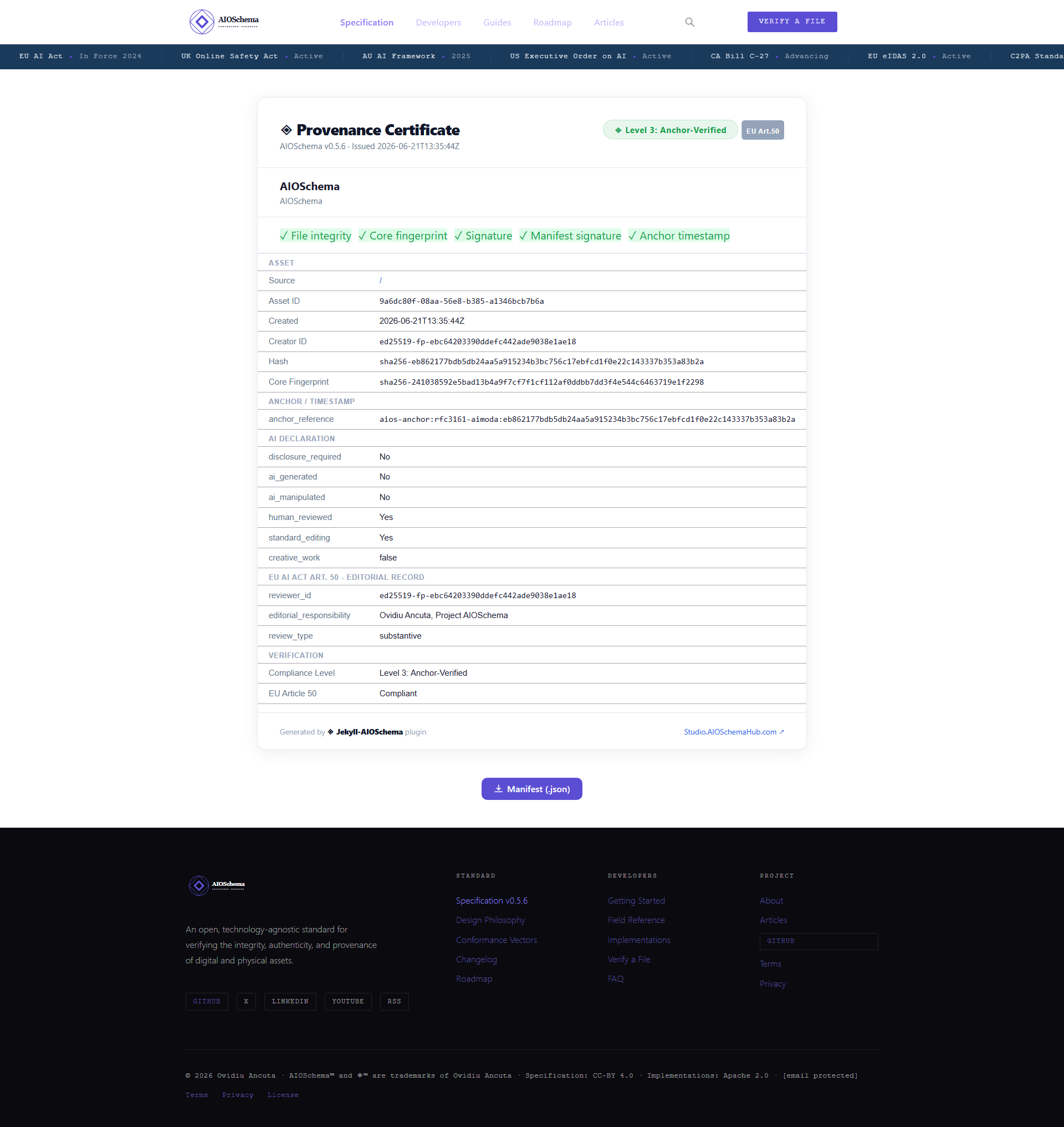
The Provenance Certificate generated by the Jekyll-AIOSchema plugin for the AIOSchema homepage. It surfaces every verification layer in one view: file integrity, core fingerprint, signature, manifest signature, and anchor timestamp. The EU AI Act Art. 50 editorial record is included directly from the extensions block.
Part 5: Level 3 – Temporal Proof
What Level 3 adds
Level 3 adds an anchor: an independently verifiable, immutable, public
timestamp that proves the asset existed in this exact state at a specific
point in time. The anchor is produced by a third-party service that is
independent of the asset creator. This is the critical distinction from
Level 2: at Level 2, the creator signs the manifest, but the creator could
in principle have backdated the creation_timestamp. At Level 3, the
timestamp comes from an independent service whose records are public and
immutable.
5.1 The Anchor URI Scheme
Every anchor is referenced by a URI in this format:
aios-anchor:<service-id>:<anchor-id>
In the homepage manifest:
aios-anchor:rfc3161-aimoda:eb862177bdb5db24aa5a915234b3bc756c17ebfcd1f0e22c143337b353a83b2a
This breaks down as:
rfc3161-aimoda– the service identifier: an RFC 3161 Trusted Timestamp Authority operated by Aimoda.eb862177bdb5db24aa5a915234b3bc756c17ebfcd1f0e22c143337b353a83b2a– the anchor identifier: in this case, the SHA-256 hex value of the asset itself, which the service uses as the lookup key for the anchor record.
The URI scheme is service-agnostic. Any publicly verifiable, immutable, independently operated timestamping mechanism can serve as an anchor: an RFC 3161 TSA, a blockchain-based timestamping service, a hybrid service, or any future mechanism that produces an independently verifiable, immutable, public timestamp. AIOSchema mandates only these four properties. No specific service is mandated.
5.2 The Anchor File
When an RFC 3161 TSA is used as the anchor service, the anchor operation
produces a binary timestamp token: a .tsr file (Timestamp Response).
For the homepage, this file is index.md.aios.json.tsr – it records
that the sidecar file existed at the timestamp the TSA signed, with a
cryptographic proof chain back to the TSA’s own certificate.
The .tsr file is independently verifiable using any RFC 3161-compliant
tool, without contacting aioschema.org and without any AIOSchema-specific
software. The TSA’s public certificate chain is the only dependency.
5.3 What Gets Anchored
The anchor service stores, at minimum: asset_id, core_fingerprint, and
the timestamp of the anchor operation. It should also store signature
when present.
core_fingerprint is the anchor payload because it is a deterministic,
tamper-evident summary of the asset’s complete identity at a point in time.
Anchoring core_fingerprint means you can later prove that the specific
asset identified by that hash existed – in the hands of the creator
identified by creator_id – before the anchor timestamp. You do not need
to anchor the asset itself, only its identity record.
When the anchor service also stores signature, it enables a re-signing
attack detection check during verification: the verifier can confirm that
the signature value in the current manifest matches what was stored at
anchor time. A mismatch means the manifest was re-signed with a different
key after anchoring – a red flag that the verifier surfaces as a warning.
5.4 Generating a Level 3 Manifest
The following is the homepage manifest in full at Level 3, with the real
anchor_reference populated:
{
  "core": {
    "asset_id": "9a6dc80f-08aa-56e8-b385-a1346bcb7b6a",
    "schema_version": "0.5.6",
    "creation_timestamp": "2026-06-21T13:35:44Z",
    "hash_original": "sha256-eb862177bdb5db24aa5a915234b3bc756c17ebfcd1f0e22c143337b353a83b2a",
    "creator_id": "ed25519-fp-ebc64203390ddefc442ade9038e1ae18",
    "core_fingerprint": "sha256-241038592e5bad13b4a9f7cf7f1cf112af0ddbb7dd3f4e544c6463719e1f2298",
    "signature": "ed25519-7404d5e4f1cee8a70cfbd7f6dbdb83a1f37a48407a99e50a141d0d30208d21aec75612551f28b4565ca61b22cd2d35d151e5b34398cfd9e5ec194898c672d10a",
    "manifest_signature": "ed25519-286e24741c0d94afb90bc540a8e0d88dcdfccf26a44d8d47622fddf10ad0bf706cdb39e671687a40386cc7c459d5fa4bd148ec67294e6f7486652791ae8b270d",
    "anchor_reference": "aios-anchor:rfc3161-aimoda:eb862177bdb5db24aa5a915234b3bc756c17ebfcd1f0e22c143337b353a83b2a",
    "previous_version_anchor": null
  },
  "extensions": {
    "asset_name": "AIOSchema",
    "description": "AIOSchema",
    "ai_declaration": {
      "ai_generated": false,
      "ai_manipulated": false,
      "human_reviewed": true,
      "standard_editing": true,
      "creative_work": false,
      "disclosure_required": false
    },
    "compliance": {
      "eu_art50": {
        "reviewer_id": "ed25519-fp-ebc64203390ddefc442ade9038e1ae18",
        "editorial_responsibility": "Ovidiu Ancuta, Project AIOSchema",
        "review_type": "substantive"
      }
    },
    "public_key": "Fi00S1HLbSi+eXOLuFDByIBNW9vOBbTZ3nsYbISeBlY=",
    "compliance_level": 3
  }
}
The generation procedure:
- Complete the Level 2 manifest in full (all steps from Part 4).
- Submit
asset_id,core_fingerprint, andsignatureto the chosen anchor service. - Receive the
anchor_referenceURI back from the service. Also store the anchor proof file (e.g. the.tsrfile for RFC 3161 services) alongside the sidecar. - Add
anchor_referenceto the core block. - Because
anchor_referenceis a core field, its addition changes the manifest. Themanifest_signaturemust be recomputed to cover the updated manifest. Recomputemanifest_signatureover the complete updated manifest (withmanifest_signatureset to null) and update the sidecar. - Rewrite the sidecar file and update the XMP embedding if applicable.
Note: anchor_reference is part of the core block but is NOT one of the
five fields used to compute core_fingerprint. Adding the anchor reference
does not change core_fingerprint or signature – only
manifest_signature needs updating after anchoring.
5.5 Verifying a Level 3 Manifest
Verification executes all Level 1 and Level 2 steps, then continues:
- Parse the
anchor_referenceURI. Extract the service identifier and anchor identifier. - If
verify_anchoris enabled (the default): call theanchor_resolverfor the identified service. The resolver fetches the anchor record from the service’s public endpoint. - Compare the
asset_idandcore_fingerprintfrom the anchor record against the manifest values using timing-safe equality. Both must match. - If the anchor record includes a
signaturevalue: compare it against the current manifest’ssignaturefield. A mismatch is a warning – it indicates the manifest may have been re-signed with a different key after the anchor was created. - Set
anchor_verified: trueon match. - Return a
VerificationResultwithsuccess: true,match_type: "hard",signature_verified: true,manifest_signature_verified: true,anchor_checked: true,anchor_verified: true.
Offline verification: If verify_anchor is set to false, or if the
anchor service is unreachable, the verifier returns anchor_verified: false
with a warning and continues. The integrity and signature checks still pass.
This is the correct behaviour for air-gapped or offline environments.
Part 6: The Verification Result
Every conforming verifier returns a structured result object after running the verification procedure. The result covers all three levels and indicates which checks were performed and what their outcomes were.
| Field | Type | Description |
|---|---|---|
success |
Boolean | True if all applicable checks passed. False on any failure. |
message |
String | Human-readable summary of the verification outcome. |
match_type |
String or null | "hard" if hash_original matched exactly. "soft" if only a pHash soft match was found. null if verification failed before a match could be determined. |
signature_verified |
Boolean | True if signature was present, a public key was resolved, and the signature was valid. |
manifest_signature_verified |
Boolean | True if manifest_signature was present and valid. Confirms the extensions block has not been altered since signing. |
anchor_checked |
Boolean | True if anchor_reference was present and verification was attempted. |
anchor_verified |
Boolean | True if the anchor record was fetched and both asset_id and core_fingerprint matched. |
warnings |
Array of strings | Non-fatal issues encountered during verification, such as a soft match, an unresolvable public key, or a re-signing indicator. |
The fields become meaningful progressively by level:
- Level 1:
success,message,match_typeare the relevant outputs.signature_verifiedandanchor_verifiedwill be false (no signatures or anchors at Level 1). - Level 2: All of the above plus
signature_verifiedandmanifest_signature_verified. - Level 3: All fields apply.
anchor_checkedandanchor_verifiedare only true at Level 3.
Next Steps
- Conformance test vectors – validate your implementation against the normative test suite
- Field reference – complete documentation for every core and extension field
- Specification – the full normative specification
- Reference implementations – Python, TypeScript, Node.js, Go, Rust, and .NET